Customizing the Help Menu
Cadenza can be configured to show links in the help menu at the top right of the main header:
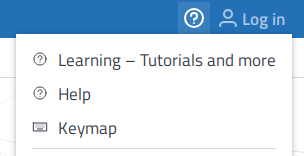
These links can be customized in the basicweb Configuration as menu entries.
The icon for each menu entry is derived from its id (a help icon for entries of type help, etc).
Additionally, depending on the id type, you can specify a URL and a name.
In our default distribution we include links to our online documentation for the German and English locales. If you want to change these links to point to either a local copy of the documentation running in your own infrastructure or a different set of contents altogether, you can change the URLs accordingly.
For example if you have Cadenza running on https://example.com/cadenza/ and have made the documentation image available on https://example.com/cadenzadocs/ you could point to your own help URLs in the following way:
-
Multi-File XML Configuration
-
Single-File Configuration
basicweb-config.xml configuration file<?xml version="1.0" encoding="UTF-8"?>
<basicWebConfiguration>
<publicCadenzaUrl>https://example.com/cadenza/</publicCadenzaUrl>
<management>
<maxConcurrentUsers>10</maxConcurrentUsers>
</management>
<appearance>
<menuEntries>
<menuEntry id="help">
<url>https://example.com/cadenzadocs/learning-help/</url>
<printNameKey>learning.link.label</printNameKey>
</menuEntry>
<menuEntry id="help">
<url>https://example.com/cadenzadocs/user-help/</url>
<printNameKey>help.link.label</printNameKey>
</menuEntry>
</menuEntries>
</appearance>
</basicWebConfiguration>myConfig.yamlcadenzaconfig:
settings:
basicweb:
management:
maxConcurrentUsers: 10
appearance:
menuEntries:
- id: "help"
printNameKey: "learning.link.label"
url: "https://example.com/cadenzadocs/learning-help/"
- id: "help"
printNameKey: "help.link.label"
url: "https://example.com/cadenzadocs/user-help/"In this case the value help.link.label and learning.link.label must exist in your custom message properties (see Customizing Message Properties) and will resolve to the language that Cadenza is started with.
With this configuration Cadenza will show two menu entries in the help menu with a help icon, the resolved label and the link pointing to the configured URLs.
Similarly, you can also provide different links for different locales. The configuration file could look like this (note the urlKey configuration instead of a plain URL:
-
Multi-File XML Configuration
-
Single-File Configuration
basicweb-config.xml configuration file<?xml version="1.0" encoding="UTF-8"?>
<basicWebConfiguration>
<publicCadenzaUrl>https://example.com/cadenza/</publicCadenzaUrl>
<management>
<maxConcurrentUsers>10</maxConcurrentUsers>
</management>
<appearance>
<menuEntries>
<menuEntry id="help">
<urlKey>help.link.url</urlKey>
<printNameKey>help.link.label</printNameKey>
</menuEntry>
</menuEntries>
</appearance>
</basicWebConfiguration>myConfig.yamlcadenzaconfig:
settings:
basicweb:
management:
maxConcurrentUsers: 10
appearance:
menuEntries:
- id: "help"
printNameKey: "help.link.label"
urlKey: "help.link.url"In this case the help.link.url must exist in your custom message properties.